Samples#
In Samples of the repository, one group project
(ProRock.Samples.groupproj). The generated units and the source WSDL/XSD files are included, so the samples build without
running the generator.
| Sample | What it shows |
|---|---|
ProRock.Xmlite.DocumentProperties |
the properties of any Office document: open, edit, save |
ProRock.Soapite.CheckVatService |
EU VIES VAT number validation through the generated TCheckVatService, with live SOAP Fault handling |
ProRock.Soapite.WsSecurity |
a WS-Security UsernameToken (PasswordDigest, Nonce, Timestamp) in the SOAP header, from units generated from the OASIS schemas; offline, or -live. Other header blocks work the same way, e.g. the ebMS 3.0 eb:Messaging of AS4 |
ProRock.Http.ClientCertificate |
client certificates (mutual TLS) against the public test server client.badssl.com: HTTP 400 without, 200 with - from a file and from memory |
ProRock.Soapite.Calculator |
a generated client calling a public calculator service (-soap12 and -xml switches) |
ProRock.Xmlite.Namespaces |
a generated metamodel from order.xsd: parsing, enums, serialization, round trip |
ProRock.Xmlite.Basic |
hand-written models, basic parsing and serialization |
Office document properties#
ProRock.Xmlite.DocumentProperties
opens any Office document (.docx, .xlsx, .pptx) and edits the properties Office shows in File > Info: title, subject,
author, keywords, description, category, status. Save writes them back; Excel opens the saved file without a repair prompt
and shows every value in File > Info.
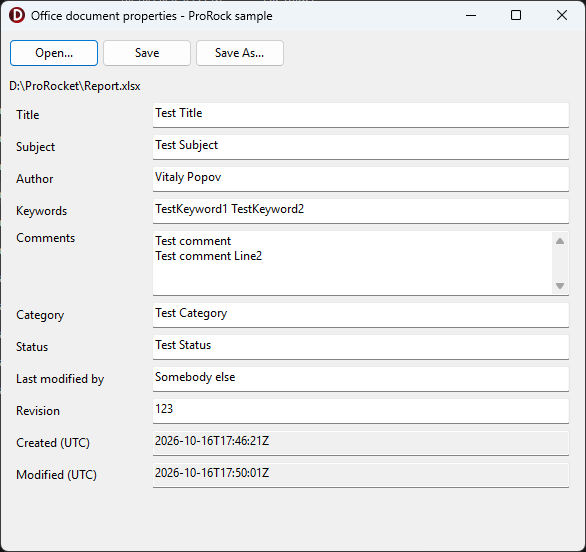
An Office document is a zip of XML parts (OPC, ECMA-376 Part 2). The sample uses units generated from the official schemas:
opc-relationships.xsd- to find the core properties part through the package relationships (_rels/.rels)opc-coreProperties.xsd, built on Dublin Core - the properties themselves (docProps/core.xml)
// the generated classes: Dublin Core elements carry their text in XmlValue (dc:title, dcterms:created), the elements of
// the core properties namespace are plain strings (cp:category), cp:keywords is mixed content - its text is XmlText
var properties := fDocument.Properties;
TitleEdit.Text := properties.Title.XmlValue;
KeywordsEdit.Text := properties.Keywords.XmlText;
CategoryEdit.Text := properties.Category;
On save, Modified is set to now (UTC) with the xsi:type OPC requires, and every other part of the file is copied byte for
byte, in the same order and with the same compression:
fProperties.Modified.XmlValue := FormatDateTime('yyyy-mm-dd"T"hh":"nn":"ss"Z"', TTimeZone.Local.ToUniversalTime(Now));
fProperties.Modified.SetXsiType(TW3cdtfCT); // <dcterms:modified xsi:type="dcterms:W3CDTF">
var core: TBytes := TEncoding.UTF8.GetBytes(TXmlite.ObjectToXml(fProperties));
A digitally signed document gets a warning first: the signature usually covers the core properties, so saving breaks it.
The schemas behind it use substitution groups and xsi:type - see XML concepts for what they are.